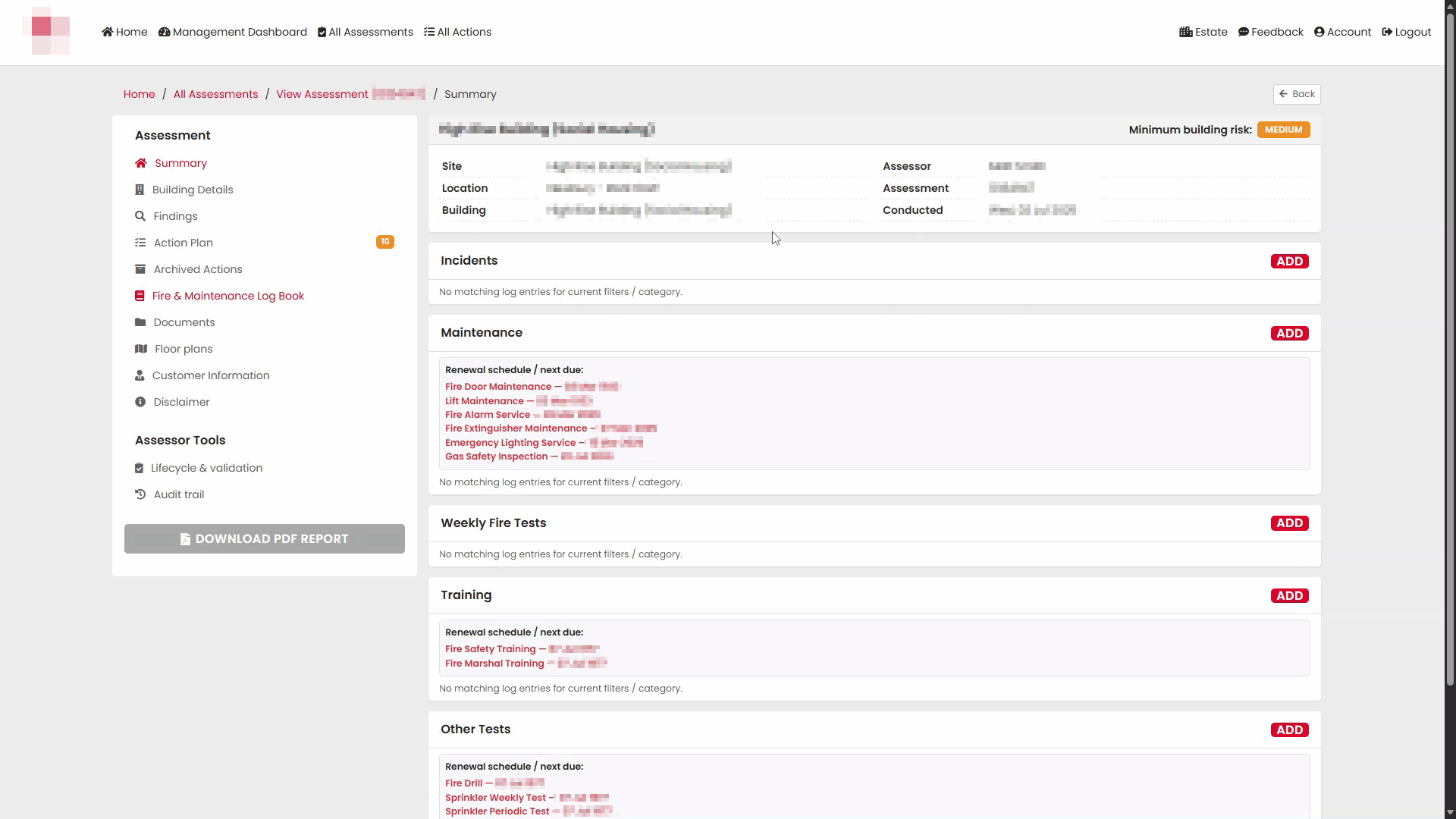
The Fire & Maintenance Log Book allows assessors, validators and customers to record and review fire safety incidents, maintenance activities, testing records and training activities associated with a building. It also provides a renewal schedule showing upcoming inspection, testing and maintenance due dates.
Who can use this Feature?
- Standard
- Standard + Estate Manager
- Admin
- Tech Admin
Accessing the Fire & Maintenance Log Book
From within an assessment, select Fire & Maintenance Log Book from the navigation menu.
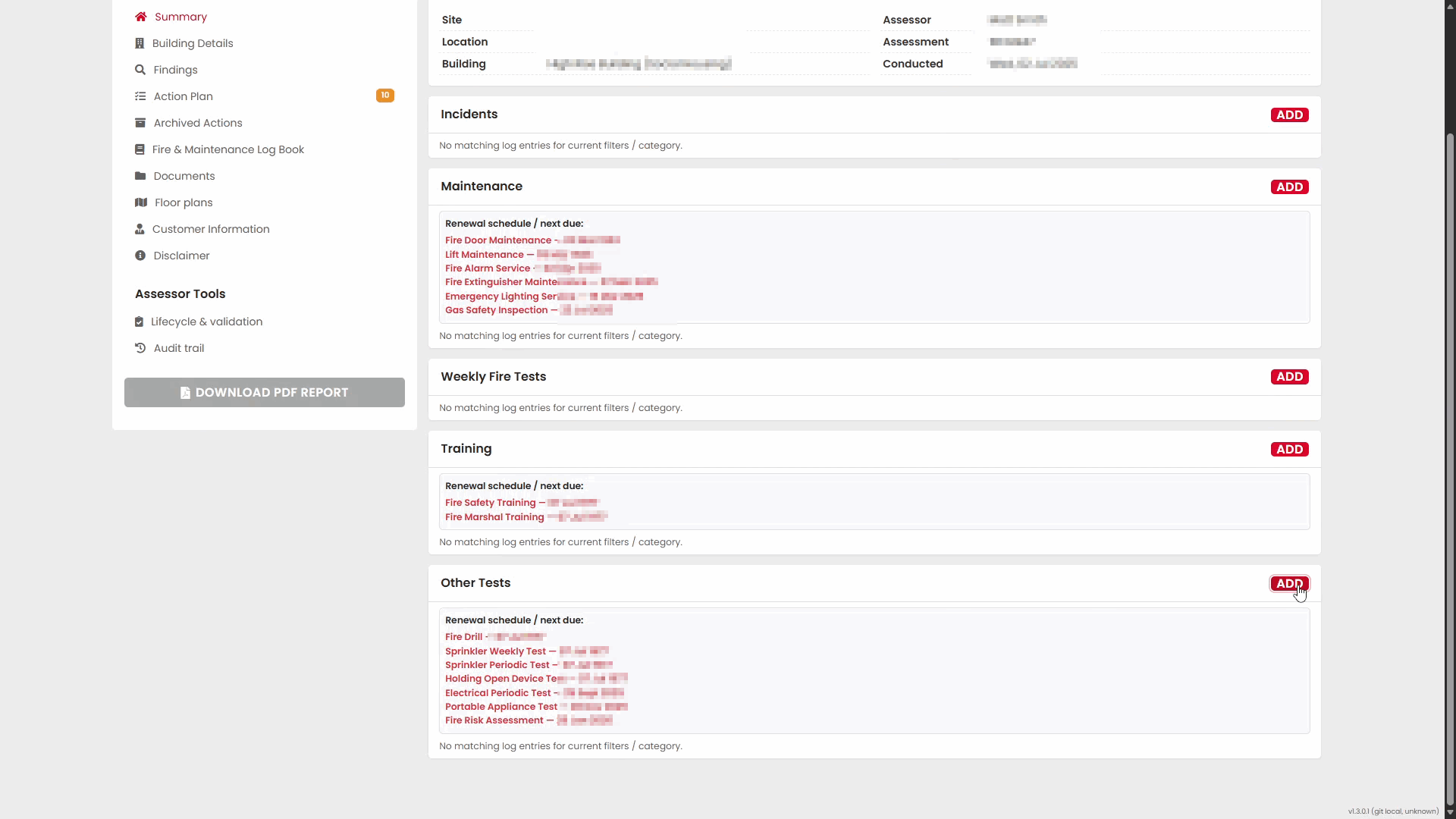
The page is divided into the following sections:
- Incidents
- Maintenance
- Weekly Fire Tests
- Training
- Other Tests
Each section includes an ADD button that can be used to create a new log entry.
The page also displays renewal schedules where applicable, helping users track activities that require future action or review.
Incidents
The Incidents section is used to record fire-related incidents or other significant events associated with the building.
Adding an Incident
Select ADD within the Incidents section.
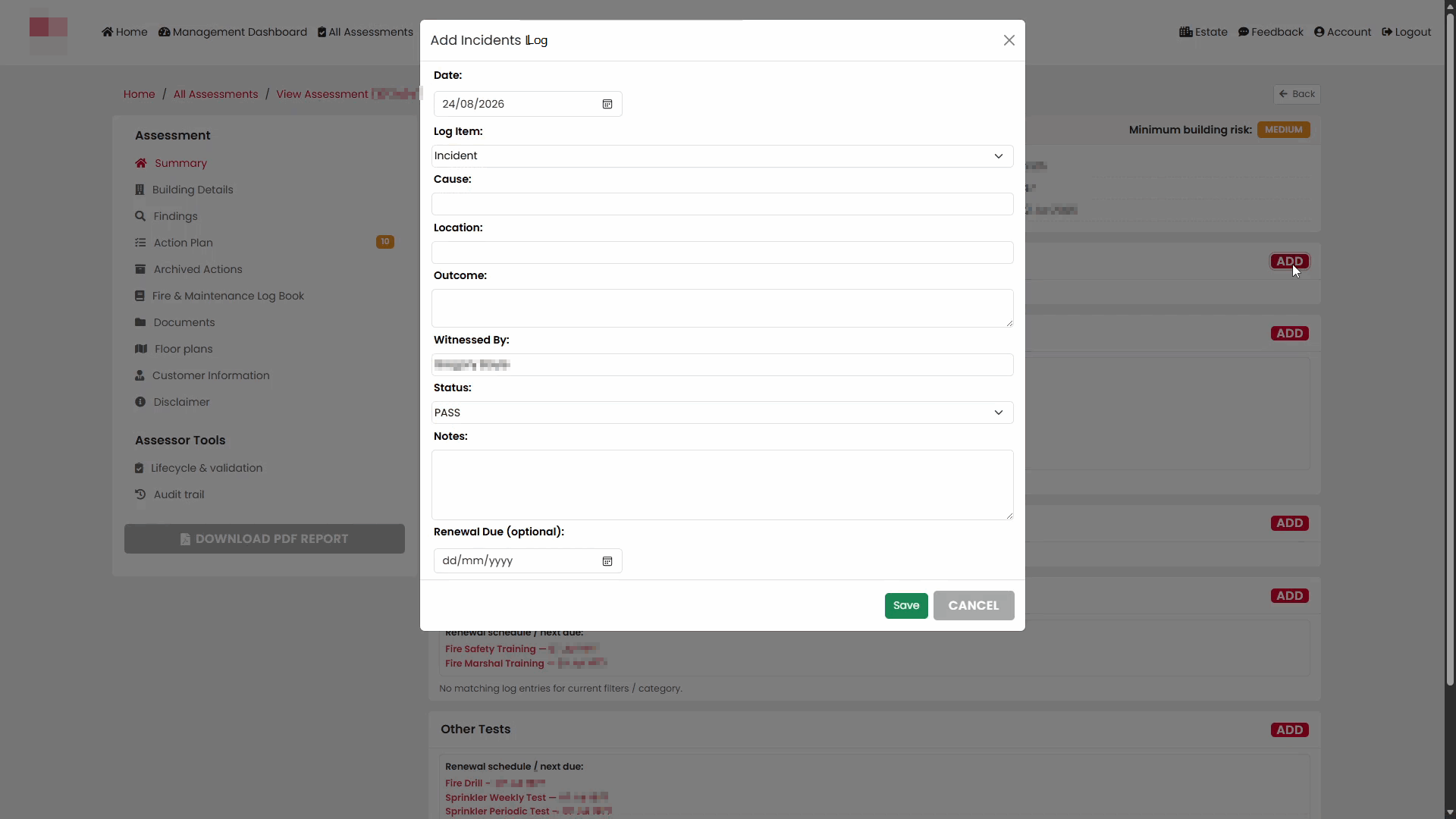
Complete the available fields:
| Field | Description |
|---|---|
| Date | Date of the incident |
| Log Item | Type of incident being recorded |
| Cause | Cause of the incident |
| Location | Where the incident occurred |
| Outcome | Outcome or result of the incident |
| Witnessed By | Person who witnessed the incident |
| Status | Current status of the incident |
| Notes | Additional information |
| Renewal Due | Optional review or follow-up date |
Selecting the Incident Date
Select the calendar icon to choose a date.
Selecting a Log Item
Choose the most appropriate log item from the available list.
Setting the Status
Select the appropriate status for the incident.
Once all required information has been entered, select Save.
Maintenance
The Maintenance section is used to record servicing, inspections and maintenance activities relating to fire safety equipment and building systems.
Adding a Maintenance Record
Select ADD within the Maintenance section.
Complete the maintenance log form.
Maintenance Fields
| Field | Description |
|---|---|
| Date | Date maintenance was completed |
| Log Item | Type of maintenance performed |
| Engineer / Visitor | Person or organisation carrying out the work |
| Reason for Visit | Purpose of the visit |
| Equipment Description | Equipment or asset worked on |
| Work Done | Details of the work completed |
| Approved By | Person approving the work |
| Approved On | Approval date |
| Description / Notes / Reason | Additional information |
| Status | Outcome of the maintenance activity |
| Notes | Additional notes |
| Renewal Due | Optional future due date |
Selecting a Maintenance Type
A range of maintenance activities can be recorded, including:
- Fire Alarm Service
- Emergency Lighting Service
- Fire Extinguisher Maintenance
- Fire Door Maintenance
- Lift Maintenance
- Gas Safety Inspection
- Dry Riser Inspection
- Wet Riser Inspection
- Legionella Risk Assessment
- TMV Maintenance
- Kitchen Extraction Duct Work Clean
Engineer and Work Information
Enter details of the engineer, visitor, equipment and work completed.
Recording Approval Information
Enter the approver and approval date where applicable.
Setting the Status
Choose the appropriate result for the maintenance activity.
Available values include:
- PASS
- FAIL
- NA
- YES
- NO
- ONGOING
- COMPLETE
- ABORTED
Save the record when complete.
Weekly Fire Tests
The Weekly Fire Tests section is used to maintain records of recurring fire safety tests.
Adding a Weekly Fire Test
Select ADD within the Weekly Fire Tests section.
Complete the form using the available fields.
Weekly Fire Test Fields
| Field | Description |
|---|---|
| Date | Test date |
| Log Item | Type of test |
| Description / Notes / Reason | Details of the test |
| Conducted By (for tests) / Engineer | Person carrying out the test |
| Status | Result of the test |
| Notes | Additional comments |
| Renewal Due | Optional future due date |
Selecting a Test Type
Available options include activities such as:
- Weekly Fire Alarm Test
- Emergency Lighting Test
- Sprinkler Tests
- Fire Extinguisher Visual Check
- Dry Riser Tests
- Wet Riser Tests
Recording Test Results
Select the relevant status and add any notes where required.
Save the record when complete.
Training
The Training section is used to record fire safety training activities undertaken at the building.
Adding a Training Record
Select ADD within the Training section.
Complete the training form.
Training Fields
| Field | Description |
|---|---|
| Date | Training date |
| Log Item | Training type |
| Duration | Length of the training session |
| Attendees | Number or details of attendees |
| Description | Training details |
| Status | Outcome or completion status |
| Notes | Additional comments |
| Renewal Due | Optional renewal date |
Training Types
Available training types include:
- Fire Safety Training
- Fire Marshal Training
- Legionella Awareness Training
Recording Attendance and Outcomes
Enter attendee details, duration and any supporting notes before saving the record.
Other Tests
The Other Tests section is used to record inspections, reviews, drills and testing activities that do not fall under the previous categories.
Adding an Other Test
Select ADD within the Other Tests section.
Complete the form.
Other Test Fields
| Field | Description |
|---|---|
| Date | Test date |
| Log Item | Type of test or review |
| Description / Notes / Reason | Summary of the activity |
| Conducted By (for tests) / Engineer | Person carrying out the activity |
| Status | Result or outcome |
| Notes | Additional information |
| Renewal Due | Optional future due date |
Selecting a Log Item
The system provides a wide range of options, including:
- Fire Risk Assessment
- Fire Drill
- Sprinkler Weekly Test
- Sprinkler Periodic Test
- Holding Open Device Test
- Portable Appliance Test
- Electrical Periodic Test
- Emergency Lighting Test
- Water Hygiene Tests
- Lightning Protection Test
- COSHH Review
- Internal Fire Door Check
Recording Results
Select the appropriate status, enter notes and choose a renewal date if required.
Select Save to create the log entry.
Renewal Schedules
The Maintenance, Training and Other Tests sections display Renewal Schedule / Next Due information where renewal dates have been recorded.
This enables users to quickly identify upcoming inspections, servicing requirements, tests and training renewals.
Renewal dates are automatically displayed within the relevant section after log entries have been saved with a Renewal Due date.
Was this article helpful?
That’s Great!
Thank you for your feedback
Sorry! We couldn't be helpful
Thank you for your feedback
Feedback sent
We appreciate your effort and will try to fix the article