Overview
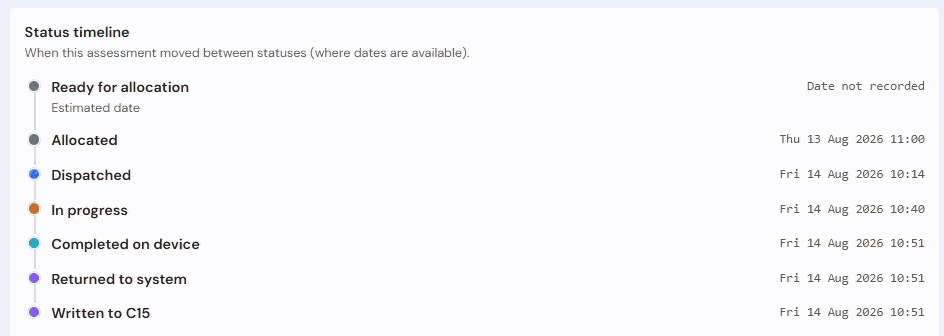
The Status Timeline provides a record of an assessment's journey through the workflow. It allows users to see which stages have been completed and when key milestones were reached.
The timeline is available from the Assessment Detail page and provides greater visibility than the status displayed in assessment lists.
Use the timeline when:
- Checking the progress of an assessment.
- Confirming that work has been completed.
- Investigating delays in the workflow.
- Reviewing validation activity.
Opening the Status Timeline
- Open the required assessment from:
- Workload
- All Assessments
- A validation area
- Open the Assessment Detail page.
- Locate the Status Timeline section.
Understanding the Timeline
The timeline displays the stages that an assessment has passed through.
Each stage is shown in sequence, allowing you to follow the assessment from allocation through to completion.
Completed stages display the date and time at which the stage was reached.
Workflow Stages
Depending on the assessment, the timeline may include some or all of the following stages.
Ready for Allocation
The assessment has been created and is awaiting assignment.
Allocated
The assessment has been assigned to an assessor.
At this stage, responsibility for completing the assessment has been assigned.
Dispatched
The assessment has been dispatched to the Assessment Recorder application.
The assessor can now access the assessment on their device.
In Progress
Work has started on the assessment.
The assessor is actively completing the assessment within the Assessment Recorder application.
Completed on Device
The assessor has completed the assessment on their device.
The assessment is ready to be returned to the system.
Returned to System
The completed assessment has been received by the central system.
Assessment data is now available for further processing.
Written to C15
The assessment data has been written to the system.
The assessment can now be reviewed within the Portal.
Reconciled
The assessment has completed reconciliation activities within the workflow.
Validation Stages
Some assessments may also display validation milestones.
Conducted
The assessment has been completed by the assessor.
Checked
The assessment has been reviewed during the validation process.
Validated
Validation activities have been completed successfully.
Released
The assessment has completed the workflow and has been released.
Identifying the Current Stage
The most recent completed stage in the timeline represents the assessment's current position within the workflow.
For example:
- If In Progress is the most recent completed stage, work is still ongoing.
- If Written to C15 is the most recent completed stage, the assessment has been returned and written into the system.
- If Released is the final completed stage, the assessment has completed the workflow.
Reviewing Delays or Workflow Progress
The timeline can help identify where an assessment currently sits within the process.
Reviewing completed stages allows users to determine:
- Whether an assessment has been started.
- Whether work has been returned from the field.
- Whether validation has been completed.
- Whether the assessment has been released.
This information can be useful when answering queries about assessment progress.
Tips
- Compare the timeline with the current status displayed on the Assessment Detail page.
- Use the timeline when investigating the history of an assessment.
- Check that stages appear in the expected order.
- Review validation milestones when confirming that validation work has been completed.
Next Steps
Continue with:
Was this article helpful?
That’s Great!
Thank you for your feedback
Sorry! We couldn't be helpful
Thank you for your feedback
Feedback sent
We appreciate your effort and will try to fix the article