Overview
Assessment Recorder allows assessors to record information that is visible internally but not included within the client-facing assessment output.
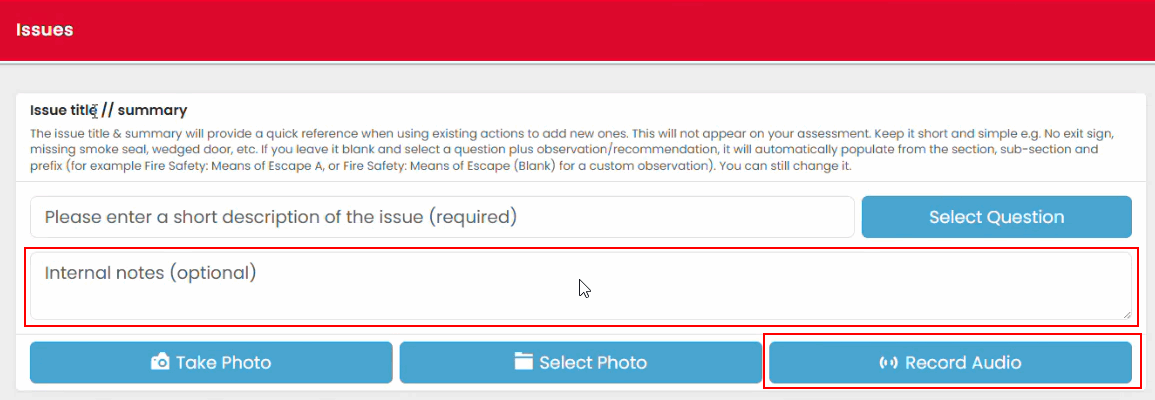
Two methods are available:
- Internal notes
- Audio notes
These features can be used to capture supporting information during the assessment process.
Using Internal Notes
Internal notes can be attached to issues and findings.
Typical uses include:
- Recording additional context
- Providing clarification
- Communicating information for review
- Capturing observations that should not form part of the final assessment narrative
To add an internal note:
- Open the issue.
- Locate the Internal Notes field.
- Enter the required information.
- Save the issue.

Using Audio Notes
Audio notes provide a quick method of recording information without typing.
Audio notes can be used to:
- Record reminders
- Capture information for later review
- Note items requiring further investigation
- Provide additional information relating to a finding
To create an audio note:
- Open the issue.
- Select the audio recording option.
- Record your note.
- Save the issue.

Internal Visibility
Internal notes and audio notes are intended for internal use only.
They provide additional information for authorised users involved in reviewing and validating assessments and are retained as part of the assessment record.
Best Practice
Keep notes:
- Clear and concise
- Relevant to the assessment
- Professional in tone
- Focused on information that supports assessment completion or review
Use notes to capture useful context while maintaining the formal assessment observations and recommendations within the main issue record.
Was this article helpful?
That’s Great!
Thank you for your feedback
Sorry! We couldn't be helpful
Thank you for your feedback
Feedback sent
We appreciate your effort and will try to fix the article